THE STARTER GUIDE
From your first rep
to the next chapter.
Push Up Crush combines real bodyweight exercise with an anime story. Here’s what you do, how your phone counts, and what comes next.
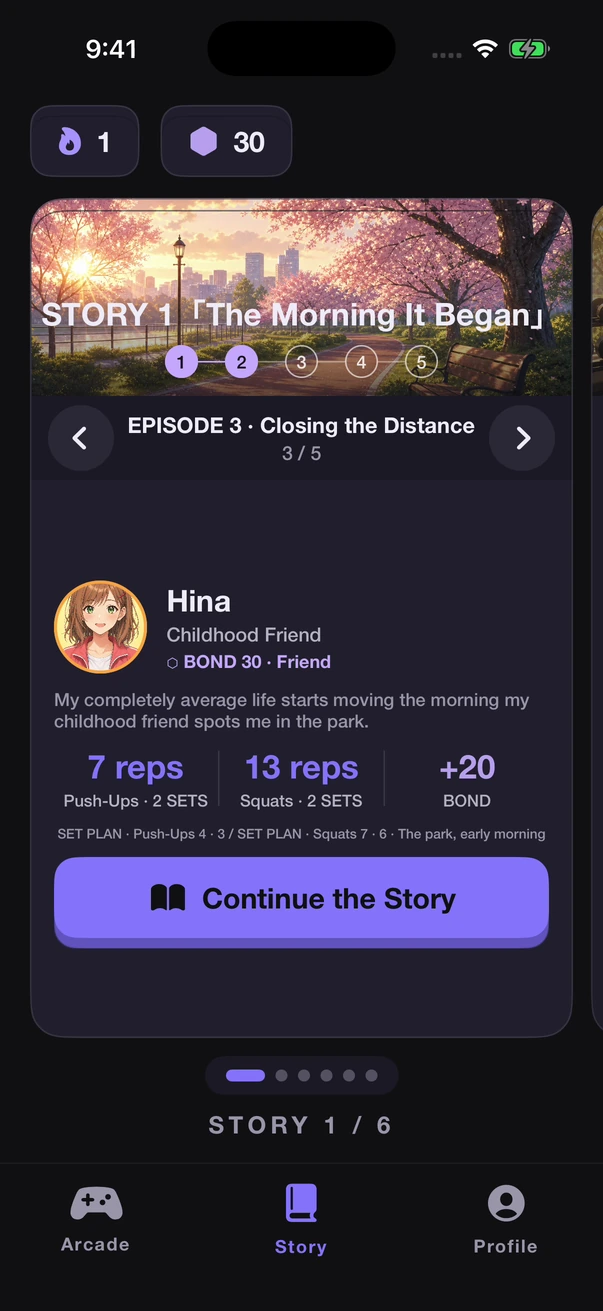
1. Start with a story
Download Push Up Crush on your iPhone and follow the introduction. Story brings together five heroines, six stories and 30 episodes. Choose an available episode and follow its exercise instructions.
2. Position your iPhone
Choose a clear space and put your phone somewhere stable. Follow the in-app camera setup guidance so your movement stays in view. Adequate lighting and a clear view help the camera detect your reps. Available counting options depend on your iPhone and iOS version.
3. Do the exercises
The workouts use real push-ups and squats. Follow the exercise shown in the app, watch your rep count and time, and work through the set at a pace that suits you. Your heroine reacts and encourages you as you go.
Keep the phone secure and give yourself enough room to move. If the counter misses movement, check your framing and lighting using the app’s guidance.
4. Find out what happens next
Complete the exercises to advance the episode. Story conversations and relationships give your effort an ongoing reward. Return for the next workout to continue the story.
5. Try a different challenge
Arcade includes Time Attack and Limit Challenge. Work toward a better score and check the leaderboard. Visit Profile to review your workout records and activity.
Before you download
Push Up Crush is free to download on iPhone. Full access requires an in-app subscription. Plans, prices, renewal terms and any eligible trial are shown in the app before you subscribe. Android is in development; join the waitlist for updates.